Multi-tasking baby. I'm talking about me here not computers. I've been swamped today trying to get VMware ESX 3 going configuring the Juniper SSL VPN box and making sure our over seas users have the proper access to their resources. Basically I am locking them down and forcing them to use the Juniper SSL VPN as their entry point. Yes I'm doing this all at the same time.
VMware ESX 3 has it's own learning curve. I've been rattling my brain just trying to install my first guest OS. I've got the VM's installed that's the easy part. For some reason the VM's won't boot from the CD-ROM. I've tried the ESX host machine and I've tried my workstation. Nadda! I've been beating the boards all morning. I ended up creating an ISO of my Windows 2003 server CD using the dd command on the ESX host.
dd if=/dev/cdrom of=/vmimages/myISO.iso bs=32k
What it does exactly I have no clue just yet. I'm joking, it's copying the files from the CD to the location it's the bs=32k that's got me. But this is the learning process anyway. I will be reinstalling once I get a handle on what exactly is happening. Also b/c I am using my only 100GB of my SAN to install all these VM's. Each VM I am giving 10GB. Eventually I will figure out best practice on the installation and how to manage LUNs off the SAN. I did a typical install :p call me a noob I don't care, two VM's with guest OS's installed more to go ;)
And as for the Juniper you can say I had a crash course in configuring that too. Under pressure it's amazing what you can do. Thats if you know what you doing.
All in all the Juniper device is great. So great in fact I ordered it today.
Wednesday, April 18, 2007

Tuesday, April 17, 2007
VMware ESX 3
Finally I can get around to installing this thing and trying it out. I'll update more once it's setup.
Wednesday, April 04, 2007
Juniper SSL VPN appliance
We are testing a Juniper SSL VPN SA-2000 appliance for 30 days. It was installed on Monday and I am impressed with what it can do. We are looking for a better VPN solution than our current. Right now we use Checkpoints secure client and we have to install that on all our remote users laptops. This limits who can VPN into the office to only those with company laptops. With the SA-2000 we can have anyone VPN into the office.
Based on the flexibility of the device we can setup policies to allow different levels of access. I can set the device to do a hardware check, user check or any combinations of checks. Example, I have hardware check on that scans the registry for company name machines based on our naming convention. If that checks out fine network connect will install. Network connect is pretty much a VPN java applet that create an SSL tunnel over http giving you an IP from a pool allowing you to have full network access. Now if the hardware check scans the registry and see that you are not a company machine you will not get network connect and will only get browser access to resources. All authentication is done via Active Directory which is nice.
If you are a certain user that is not on a company machine you have more resources published to the SSL VPN home page. Example, if I log in I will get my intranet, terminal service, all mapped drives, meeting (like webEx) and whatever other internal links that I want to add. If a regular user logs in I can have them only get Outlook Web Access and/or whatever resource they are working on internally.
I really like this solution as it pretty much the one stop shot for remote access. And the level of flexibility is great. It runs a hardened verion of LINUX not sure which distro but I can get into that some other time.
Based on the flexibility of the device we can setup policies to allow different levels of access. I can set the device to do a hardware check, user check or any combinations of checks. Example, I have hardware check on that scans the registry for company name machines based on our naming convention. If that checks out fine network connect will install. Network connect is pretty much a VPN java applet that create an SSL tunnel over http giving you an IP from a pool allowing you to have full network access. Now if the hardware check scans the registry and see that you are not a company machine you will not get network connect and will only get browser access to resources. All authentication is done via Active Directory which is nice.
If you are a certain user that is not on a company machine you have more resources published to the SSL VPN home page. Example, if I log in I will get my intranet, terminal service, all mapped drives, meeting (like webEx) and whatever other internal links that I want to add. If a regular user logs in I can have them only get Outlook Web Access and/or whatever resource they are working on internally.
I really like this solution as it pretty much the one stop shot for remote access. And the level of flexibility is great. It runs a hardened verion of LINUX not sure which distro but I can get into that some other time.
Exchange Cluster complete
So we've finished our cluster install on Friday. All mailboxes moved accept one 11GB culprit. We got Trend ScanMail installed and running. That 11GB culprit we finally got him down to 3 GB last night and moved his mailbox over. Now we can properly decommision that exchange server and reclaim the box.
Thursday, March 29, 2007
Exchange Clustering Day 5.6.7.8.9 something
In the last few days we have been moving mailboxes and trying to iron out some issues that have come up.
One issue that came up was RUS (Recipient Update Service)service was pointing to an old domain controller that was decommissioned a LONG time ago. Any way we reconfigured that. The issues that came up were when a mailbox was moved it took forever in a day for the outlook client to reconnect back. And it should reconnect back in seconds. FIXED!
Another issue we were having is when moving the mailbox that had blackberry's associated with them the BB would not be able to send emails. I think this was b/c RUS was all eF'ed up too. FIXED!
We were also having Symantec Enterprise Vault issues when we had to reset up the services to archive the public folders. The application had to associate the service to the system mailbox and it could not see ANY mailboxes. So we rebooted the EV server and we where able to see all the mailboxes and chose the system mailbox for the EV service. FIXED!
Repathing SMTP. All of our incoming and outgoing emails go to MessageLabs. You can pretty much say they have an MX record for us. They only send emails to SMTP.domain.com and only recieve emails from A.B.C.D IP's we give them. If my current single exchange server is already working can't I just swap IP's. Well yes I can't and no it will not work 100% of the time. Here is why. My firewall objects points to my exchange server, switching the internal IP on the object will work for incoming emails. SMTP.domain.com points to a public IP that is NAT'ed to an internal IP. BUT... in a cluster what we have come to find is that even though the virtual exchange server that now SMTP.domain.com will get all emails going out is totally different. Which ever node in the cluster is the active one that's the IP that will be attached to the email header. So Messagelabs is seeing this new IP from the active node trying to send emails and is rejecting it even though the emails are coming from the virtual cluster with is registered with the correct external IP. It's the active node's IP that the emails hang on to. So I had to call Messagelabs and get them to add both external IPs of the active node that I created. Well it takes 4-6 hours to propagate. We send emails to a Messagelabs cluster so the changes I've added have to hit all server in thier cluster. I was able to get emails to go out b/c some towers in the cluster had the changes and some didn't. I'll just wait until they all have the changes to switch IP's later on tonight. So now all my emails are still flowing through the single (non-clustered) exchange server. Something to watch out for if you are exchange clustering. FIXED!(in a few hours)
One issue that came up was RUS (Recipient Update Service)service was pointing to an old domain controller that was decommissioned a LONG time ago. Any way we reconfigured that. The issues that came up were when a mailbox was moved it took forever in a day for the outlook client to reconnect back. And it should reconnect back in seconds. FIXED!
Another issue we were having is when moving the mailbox that had blackberry's associated with them the BB would not be able to send emails. I think this was b/c RUS was all eF'ed up too. FIXED!
We were also having Symantec Enterprise Vault issues when we had to reset up the services to archive the public folders. The application had to associate the service to the system mailbox and it could not see ANY mailboxes. So we rebooted the EV server and we where able to see all the mailboxes and chose the system mailbox for the EV service. FIXED!
Repathing SMTP. All of our incoming and outgoing emails go to MessageLabs. You can pretty much say they have an MX record for us. They only send emails to SMTP.domain.com and only recieve emails from A.B.C.D IP's we give them. If my current single exchange server is already working can't I just swap IP's. Well yes I can't and no it will not work 100% of the time. Here is why. My firewall objects points to my exchange server, switching the internal IP on the object will work for incoming emails. SMTP.domain.com points to a public IP that is NAT'ed to an internal IP. BUT... in a cluster what we have come to find is that even though the virtual exchange server that now SMTP.domain.com will get all emails going out is totally different. Which ever node in the cluster is the active one that's the IP that will be attached to the email header. So Messagelabs is seeing this new IP from the active node trying to send emails and is rejecting it even though the emails are coming from the virtual cluster with is registered with the correct external IP. It's the active node's IP that the emails hang on to. So I had to call Messagelabs and get them to add both external IPs of the active node that I created. Well it takes 4-6 hours to propagate. We send emails to a Messagelabs cluster so the changes I've added have to hit all server in thier cluster. I was able to get emails to go out b/c some towers in the cluster had the changes and some didn't. I'll just wait until they all have the changes to switch IP's later on tonight. So now all my emails are still flowing through the single (non-clustered) exchange server. Something to watch out for if you are exchange clustering. FIXED!(in a few hours)
Friday, March 23, 2007
Exchange Clustering Day 4
We've tested mailbox moves and all works well a very small mailbox. I am in the process of moving my mailbox (700mb. I estimate it will take 40 minutes to move b/c I'm doing this in the middle of the day and the server is busy.
One thing I have to keep in mind is that the current production Exchnage server is the only server that can send emails through the firewall. Also it's the only server that can send emails to Messagelabs. So what I will have to do is change the firewall object to point to the clusters internal virtual IP. This should allow the cluster to send and recieve emails without sending on behalf of the current exchange server like it is doing now for testing.
I am also testing our blackberry functionality with the mailbox move to a new cluster as well.
One thing I have to keep in mind is that the current production Exchnage server is the only server that can send emails through the firewall. Also it's the only server that can send emails to Messagelabs. So what I will have to do is change the firewall object to point to the clusters internal virtual IP. This should allow the cluster to send and recieve emails without sending on behalf of the current exchange server like it is doing now for testing.
I am also testing our blackberry functionality with the mailbox move to a new cluster as well.
Thursday, March 22, 2007
Exchange Clustering Day 3
Today we are tweking the cluster and configuring replication on the public folders since that will take forever in a day. DAMN a day if will take a few days. We have a 100GB public information store. Yeah we really use our public folders. Hopefully today we can move a test mailbox over to the cluster and see the results.
Exchange Clustering Day 2
Day 2 was actually yesterday. It was a bit busy and frustrating at times. One of both servers were acting real funny right from the very beginning. On one the OS service pack 2 wasn't showing up in Add remove programs but it was installed. I even went ahead and installed it again three times. We went ahead and installed exchange on both servers and then created the exchange virtual server. The exchange virtual server was created but creating an IP Address Resource a Network Name Resource and a Physical Disk Resource then the System Attendant resource which allowed the cluster to show up in the Organization.
After that the failover from server A to B and back was taking enirely too long. Then Exchange SP2 wouldn't install on server A. The MSDTC service would always fail to start. So we followed some of the articles to remove and re-add it but the service never added back for some reason. So at the very end of the day I said made the decision to REFORMAT both servers and reinstall.
We've decided to look for some newer hardware drivers and firmware updates and found some and installed those. Then we replaces the heartbeat cross-over cable. Then reinstalled. Everything works so much better and the service pack was installed before the cluster was brought up this time, LOL!
That was yesterday.
After that the failover from server A to B and back was taking enirely too long. Then Exchange SP2 wouldn't install on server A. The MSDTC service would always fail to start. So we followed some of the articles to remove and re-add it but the service never added back for some reason. So at the very end of the day I said made the decision to REFORMAT both servers and reinstall.
We've decided to look for some newer hardware drivers and firmware updates and found some and installed those. Then we replaces the heartbeat cross-over cable. Then reinstalled. Everything works so much better and the service pack was installed before the cluster was brought up this time, LOL!
That was yesterday.
Tuesday, March 20, 2007
Exchange Clustering Day 1
After getting the RAM and HBA's into the server, it racked, heartbeat connected and LAN connection we installed the OS and patched them. We've named them A and B and got the carving work all set on the SAN. We've carved up 64GB for logs, 100GB for private store and 150GB for public store. We've also carved us 500mb for the Quorum drive and 5GB for the exchange mounts. The exchange LUN is to minimize the amount of drive letters that will show up in the server. There will only be C: E: and Q: NO D: F: G: H: Why? Here is why. In the drive labled exchange there will be mount points to the transaction logs, the private information store and public information store. Normally these mounts would have been drive letters in my computer.
Then we'll turn off one of the servers. In this case B. We'll assign the the Quorum and exchnage LUN to server A and run diskpart to offset the disk for performance.
diskpart
select disk #
create partition primary align=64
Do this for each LUN as per EMC's best practice.
Shut down server A and bring up server B. On server B we'll just assign the LUNs that we've just assigned to A. (NOTE you technically are not suppose to assign a sign LUN to two servers the acception is in a cluster environment which we are implementing. This is why one server is turned off). Once assigned we can run cluster manager. It does not matter what server we are on as long as one of them is turned off.
On cluster administrator click open and create new cluster. Add the current server to the cluster. This server will be in the cluster alone for now and most importantly LOCK the shared LUN's so the other server cannot write to it when it's turned back on. Add the name of the other server in the wizard. Once done turn the other server back on. Open cluster administrator on that server ( the one just turned on) and run the wizard but select add node to cluster.
The cluster should be all set up now. You should see your heartbeat and LAN connections under networks. You will have to setup disks in the Cluster group for all your LUN's even the LUN's that are mount point in the Exchnage LUN created eariler. You should also see who the server owner is for the disk are at that given time. There can only be one server owner for the disks. You can change owners which will shift the disks over to the other server by right clicking on Cluster group and move group. This will move the disks manually over to the other server in the node. This will automatically happen in the event that something happens to the active server. I am setting up an active/passive cluster BTW.
Exchange install tomorrow.
Then we'll turn off one of the servers. In this case B. We'll assign the the Quorum and exchnage LUN to server A and run diskpart to offset the disk for performance.
diskpart
select disk #
create partition primary align=64
Do this for each LUN as per EMC's best practice.
Shut down server A and bring up server B. On server B we'll just assign the LUNs that we've just assigned to A. (NOTE you technically are not suppose to assign a sign LUN to two servers the acception is in a cluster environment which we are implementing. This is why one server is turned off). Once assigned we can run cluster manager. It does not matter what server we are on as long as one of them is turned off.
On cluster administrator click open and create new cluster. Add the current server to the cluster. This server will be in the cluster alone for now and most importantly LOCK the shared LUN's so the other server cannot write to it when it's turned back on. Add the name of the other server in the wizard. Once done turn the other server back on. Open cluster administrator on that server ( the one just turned on) and run the wizard but select add node to cluster.
The cluster should be all set up now. You should see your heartbeat and LAN connections under networks. You will have to setup disks in the Cluster group for all your LUN's even the LUN's that are mount point in the Exchnage LUN created eariler. You should also see who the server owner is for the disk are at that given time. There can only be one server owner for the disks. You can change owners which will shift the disks over to the other server by right clicking on Cluster group and move group. This will move the disks manually over to the other server in the node. This will automatically happen in the event that something happens to the active server. I am setting up an active/passive cluster BTW.
Exchange install tomorrow.
VMware consolidation project, answer
To answer my own question of how a VMware server with 5 host and 4 HBA's (2 going to the SAN and 2 going to the XServeRAID) will share resourse?
I'll need ESX server and the ESX server will find all the hardware. It will act as the sole server connected to the SAN and XServeRAID. The five virtual server will no nothing of these storage devices. The ESX server will have the two paths to the SAN and two paths the the XServeRAID with two of each HBA. Once setup the ESX server will have the drives needed for each server before the actual virtual servers are installed. Then I'll install the OS's and assign the disks to each server.
I can't wait to tackle this project.
I'll need ESX server and the ESX server will find all the hardware. It will act as the sole server connected to the SAN and XServeRAID. The five virtual server will no nothing of these storage devices. The ESX server will have the two paths to the SAN and two paths the the XServeRAID with two of each HBA. Once setup the ESX server will have the drives needed for each server before the actual virtual servers are installed. Then I'll install the OS's and assign the disks to each server.
I can't wait to tackle this project.
Friday, March 16, 2007
VMware consolidation project
As I am starting my installation for my Exchange cluster project at the same time I am thinking about future projects. What came to mind was to consolidate five servers into one VMware box. Sounds easy enought but I have questions that I am uncertain about. We have;
Intranet server
OWA server
file server (Lib)
file server (home directorys)
file server (img)
I wan't my IIS servers to pull their data from my SAN (separate LUNS). I want my File server (lib) to pull from the SAN also (separate LUN) that's the easy part. The other two server File server (home directory) and (img) I'd like them to pull data from an XServeRAID. Being that the XServeRAID is not a SAN (in our environment) I cannot give them their own LUNS. They would be sharing the same volume if I set it up in it's current state and that is not good practice. So I'd ether have to put one or the other on the SAN. Anyway the real question is if I have these five servers on one physical box with four HBA's (2 to the SAN and 2 to the XServeRAID). How would five servers share four HBA's using VMware? Are virtual HBA's setup? I'll have to find out the answer to that.
VMware vendors don't call me, I'll call you.
Intranet server
OWA server
file server (Lib)
file server (home directorys)
file server (img)
I wan't my IIS servers to pull their data from my SAN (separate LUNS). I want my File server (lib) to pull from the SAN also (separate LUN) that's the easy part. The other two server File server (home directory) and (img) I'd like them to pull data from an XServeRAID. Being that the XServeRAID is not a SAN (in our environment) I cannot give them their own LUNS. They would be sharing the same volume if I set it up in it's current state and that is not good practice. So I'd ether have to put one or the other on the SAN. Anyway the real question is if I have these five servers on one physical box with four HBA's (2 to the SAN and 2 to the XServeRAID). How would five servers share four HBA's using VMware? Are virtual HBA's setup? I'll have to find out the answer to that.
VMware vendors don't call me, I'll call you.
Thursday, March 15, 2007
Update 4 External file hosting
I've also been trying to identify an external file hosting solution. I won't get into names as i don't want to directly give away the industry I work in. But some that can relate can figure that out. Or you can just ask me via email. Anyway for 200GB and 1000 users they want to charge us 90K a year to host some files for us. I can do that for a fraction of that as Verizon FIOS is available in my neighborhood now :D They've made the same joke and said it's not the storage alone we are paying but the server and the redundancy and X and Y and Z. I think it's the name that associated with them that make the price to high. Afterall they do make the applications we use the generate our large files.
Update 3 Symantec FSA
We've got Sysmantec's FSA (file system archive) installed and running. We are using this to clean up old files of the production file server. We have 1.2TB of Adobe PSD files on the file server older that 60 days. Some of you have a total of that for all your storage. Well that is a fraction of our storage and it's easily noticable via running tools to identiy files by extension and size. We are removing these files and leaving pointers so that we can get back space for our Exchange Cluster project that start next week.
Update 2 Cisco IPT
I've been dealing with our Cisco rep and our IPT implementer trying to figure out why the deployment of key features that we've liked to roll out the the user base is so painful.
The installation of our IPT system went perfectly. The migration the the new system went well also. It's been up and running for a few months now and we are satisfied with the phone system itself. What we are not satisfied with is that features of the system require different password. Pretty much every feature of Cisco Unity Connection has a separate password with different credentials. What I mean is when we setup user template originally with Unity Connection the password is 8 characters. So we went with that not knowing that when we've setup other features these features required passwords that required 6 characters. HUH! So change one set to match everything, easy fix right? WRONG! When setting up the original users on the system before rolling out these additional features you can not change the template without wiping out the user. The Template is set in stone. So as a result the users had a voice mail password of 8 characters and a PCA (Personal Communications Assistant) password of 6 characters. Not to mention a Windows password that expires every 90 days. Also we wanted to roll out the IMAP feature that allows your voice mail to show up in you outlook in a different mailbox that also has a password. You see what I'm getting at. Too many DAMN password using Unity Connection and nobody told us this when we were buying it.
These little things are easily overlooked of too stupid to even ask if you are buying a 250K phone system. You would thing Cisco would streamline some of these features and the dumbest thing an ordinary person can think of would be there. Sadly that is not the case.
Another gripe with Cisco's IPT is that we went with Unity Connection b/c we did NOT want our voice mails stored on our exchange server which is what Unified Messaging does. Unified Messaging has all these feature single password (I think) but the VM's are stored inside the Exchange server. That's a NO NO on so many levels. Some companies have very strict email policies and emeil are deleted every X days. If VM's are in there they are automatically treated like emails and wiped out. Financial firms come to mind. Law firms also. So this is why Unity Connection is there. VM's are not stored on the Exchange server. They are kept in the Unity server. But Unity Connection has all the crap I discussed up top. So why don't they have the best of both worlds? Who knows! The ideal product will be Unified Messaging with the ability to pick where you wanted to store your voice mails. If I wanted them in my Exchange server that would be the default. If I wanted them on another server server with links to exchange that should be an option. It can be done this is America and we are in 2007 anything can be done. We use Symantic Enterprise Vault to archive emails that pulls emails out of the Exchange server and stores them in a database on another server/storage device but leaves a pointer to those archives. One click and it's back in seconds. The same thing can happen with VM too Cisco. Wake up!
The installation of our IPT system went perfectly. The migration the the new system went well also. It's been up and running for a few months now and we are satisfied with the phone system itself. What we are not satisfied with is that features of the system require different password. Pretty much every feature of Cisco Unity Connection has a separate password with different credentials. What I mean is when we setup user template originally with Unity Connection the password is 8 characters. So we went with that not knowing that when we've setup other features these features required passwords that required 6 characters. HUH! So change one set to match everything, easy fix right? WRONG! When setting up the original users on the system before rolling out these additional features you can not change the template without wiping out the user. The Template is set in stone. So as a result the users had a voice mail password of 8 characters and a PCA (Personal Communications Assistant) password of 6 characters. Not to mention a Windows password that expires every 90 days. Also we wanted to roll out the IMAP feature that allows your voice mail to show up in you outlook in a different mailbox that also has a password. You see what I'm getting at. Too many DAMN password using Unity Connection and nobody told us this when we were buying it.
These little things are easily overlooked of too stupid to even ask if you are buying a 250K phone system. You would thing Cisco would streamline some of these features and the dumbest thing an ordinary person can think of would be there. Sadly that is not the case.
Another gripe with Cisco's IPT is that we went with Unity Connection b/c we did NOT want our voice mails stored on our exchange server which is what Unified Messaging does. Unified Messaging has all these feature single password (I think) but the VM's are stored inside the Exchange server. That's a NO NO on so many levels. Some companies have very strict email policies and emeil are deleted every X days. If VM's are in there they are automatically treated like emails and wiped out. Financial firms come to mind. Law firms also. So this is why Unity Connection is there. VM's are not stored on the Exchange server. They are kept in the Unity server. But Unity Connection has all the crap I discussed up top. So why don't they have the best of both worlds? Who knows! The ideal product will be Unified Messaging with the ability to pick where you wanted to store your voice mails. If I wanted them in my Exchange server that would be the default. If I wanted them on another server server with links to exchange that should be an option. It can be done this is America and we are in 2007 anything can be done. We use Symantic Enterprise Vault to archive emails that pulls emails out of the Exchange server and stores them in a database on another server/storage device but leaves a pointer to those archives. One click and it's back in seconds. The same thing can happen with VM too Cisco. Wake up!
Update 1 Exchange
So what has been going on since my last post that was on.......January 4th? Well back in January One of our exchange servers had a hardware failure. This server was in our remote office in London. The server was down for a day or two b/c there was no hardware 4 hours turn around time waranty on parts. As a result of that some very important people could not get email on that end. This important person wanted this to never happen again. So I come up with a solution for both offices. (oh just to be clear I do not administer the london office, my counter part does that. My servers have 4 hour turn around time on parts.) With that said I've come up with a solution for both offices.
My solution is to cluster the exchange servers in both offices. Increasing the rundancy of the server. Both offices currtly have one exchange 2003 server. All email flows come into the NY office and goes to the LD office across our private line. Next week we will start this project in both offices. My solution requires two new exchnage server running on MS Server 2003 Enterprise Edition. The information stores will be held on our SAN and in the SAN in the LD office. This is going to set ourselves up to start cloning the databases for backups and do away with tape, sort of. Our current exchnage 2003 server will act as a restore server. It will be hanging off the cluster so to speak and in the event of restoring that server will be the one mounting the database (information store).
My solution is to cluster the exchange servers in both offices. Increasing the rundancy of the server. Both offices currtly have one exchange 2003 server. All email flows come into the NY office and goes to the LD office across our private line. Next week we will start this project in both offices. My solution requires two new exchnage server running on MS Server 2003 Enterprise Edition. The information stores will be held on our SAN and in the SAN in the LD office. This is going to set ourselves up to start cloning the databases for backups and do away with tape, sort of. Our current exchnage 2003 server will act as a restore server. It will be hanging off the cluster so to speak and in the event of restoring that server will be the one mounting the database (information store).
Thursday, January 04, 2007
Exchange GAL updating
I've been beating myself over the head for a while now trying to figure out why my GAL (Global Address List) wasn't updating in Outlook when I make changes to a user account or AD object. When you create users in AD even if they are test users they will show up in the GAL if you are not copying a preexisting configured template. We try to keep our GAL clean and free of all the crap that we test but some times if we don't delete the accounts or can't for that matter they show up in the GAL. So I would go in and hide the user from the GAL. Exchange/Outlook is funny where you have to either close outlook and reopen it for the changes to show or restart the Information store to force the change. Well recently I remember one of my colleagues saying it was best to have Outlook cache mode on. I sort of disagreed but I turning it on anyway and forgot about it. So I get to request to clean up the GAL. I proceed to do so and low and behold the names in GAL still show up. I remember this happening in the past a restart of the Information Store always fixed it. Not this time. Then I go and check Outlook to see if it was caching and yes as I mentioned before I forgot that I turned caching on and it was keeping all of the information. Don't know why cache insists on keeping the information even after restarting the Information Store and restarting outlook. A safety net perhaps?
Thursday, December 28, 2006
Server Crash.....
Today during the last week of the year where it is the most quite and boring a server decides to crash. Hardware failure is the error on the BSOD. This server is for our archive. It is connected to both of our Apple XServer RAIDs via fiber channel switch. And to top it off a user is requesting archive material.
No worries though this is where a storage area network SAN shines. All I did was rezone the WW names of the two XServe RAIDs from the dead server to another server and wah-lah the drives are back online. Took mear minutes.
No worries though this is where a storage area network SAN shines. All I did was rezone the WW names of the two XServe RAIDs from the dead server to another server and wah-lah the drives are back online. Took mear minutes.
Tuesday, December 12, 2006
All users on the new SAN volume (event ID 55 cont.)
So my strategy worked like a charm. Robocopying all the data to our new volume (SAN) and using ViceVersa to mirror the data between the source (internal storage) and destination (SAN). I removed the share from the old volume and created the same name on the SAN volume. No one had to reboot or anything. Very transparent.
Now I'll wait a few days to make sure everyone has everything before I completely wipe out that corrupt partition.
Now I'll wait a few days to make sure everyone has everything before I completely wipe out that corrupt partition.
Monday, December 11, 2006
So my Event ID: 55 errors are back
Actually they never left. They are just more frequent again and last week the server froze up twice in the same day. What is my problem. Here it is.
Event ID: 55
Source: NTFS
Description: The file system structure on disk is corrupt and unusable. Please run the chkdsk utility on the volume "Drive_letter:"
CAUSE
This behavior can occur if the NTFS volumes' Master File Table (MFT) is corrupted. The short and long file name pairs that are stored in the directory index record and the file names that are stored in the associated File Record Segment (FRS) contain case-sensitive characters that do not match.
NTFS supports case-sensitive (POSIX) file names, but Chkdsk does not check file names in case-sensitive mode.
For example, assume that the directory index record has a BADFILe.TXT entry but the FRS has a BADFILE.TXT entry for the file name. NTFS views this as being invalid or corrupted, but Chkdsk compares only the names and ignores the case. It does not make repairs.
Back to the top Back to the top
RESOLUTION
To resolve this issue, back up the volume that contains the corrupted file(s) and exclude the corrupted file(s) from the backup job. Reformat the volume, and then restore from the backup. ARE YOU SERIOUS? I MEAN ARE YOU FUCKING SERIOUS!
So what am I going to do now? I'm NOT going to run any kind of chkdsk /f I have no time for that. We already changed 2 dead disks and ran the HP diagnostics and all checked out fine. I have 1.7TB of data and cannot afford any downtime what so ever. These people around here just don't seem to understand. Here is what I am doing right now. I've installed ViceVersa and registered it. Remember that new DAE for the SAN that was 3.7TB. Well over the weekend I ran a robocopy to that location. it took 64 hours hours to complete. I started on Friday Dec 7, 7:46am and it ending on Monday Dec 11 00:24:38 2006 (whatever the hell that is)
------------------------------------------------------------------------------
Total Copied Skipped Mismatch FAILED Extras
Dirs : 78477 78466 0 0 11 0
Files : 935841 935791 0 0 50 0
Bytes :1888030907.1 m1888063666.6 m 0 0 8.5 m 0
Times : 64:38:09 60:58:02 1:39:58 2:00:08
Ended : Mon Dec 11 00:24:38 2006
C:\>
I got a few errors but at this point I could care less. Anyway back to what I am doing. Since all that data copied over the weekend there was bound to be changes. This place never sleeps. So I need ViceVersa to compare the source and destination and tell me what has changed. Then I will run the ViceVersa Sync to update from the source to the destination. But because of the nature of the error there is/are corrupted files/folders that cannot be opened, deleted and are showing as 0KB in properties. This is a problem for ViceVersa becasue when it tried to read these files to compare it bombs out. It bombs out with like 10% left at that. So in ViceVersa I had to create a profile to exclude the folder (in this case) that is causing all the trouble. If this works I'll be able to sync the two locations with this exclusion rule repath everyone to this new locatin on the SAN and destroy this corrupted NTFS volume (Thanks Microsoft).
Event ID: 55
Source: NTFS
Description: The file system structure on disk is corrupt and unusable. Please run the chkdsk utility on the volume "Drive_letter:"
CAUSE
This behavior can occur if the NTFS volumes' Master File Table (MFT) is corrupted. The short and long file name pairs that are stored in the directory index record and the file names that are stored in the associated File Record Segment (FRS) contain case-sensitive characters that do not match.
NTFS supports case-sensitive (POSIX) file names, but Chkdsk does not check file names in case-sensitive mode.
For example, assume that the directory index record has a BADFILe.TXT entry but the FRS has a BADFILE.TXT entry for the file name. NTFS views this as being invalid or corrupted, but Chkdsk compares only the names and ignores the case. It does not make repairs.
Back to the top Back to the top
RESOLUTION
To resolve this issue, back up the volume that contains the corrupted file(s) and exclude the corrupted file(s) from the backup job. Reformat the volume, and then restore from the backup. ARE YOU SERIOUS? I MEAN ARE YOU FUCKING SERIOUS!
So what am I going to do now? I'm NOT going to run any kind of chkdsk /f I have no time for that. We already changed 2 dead disks and ran the HP diagnostics and all checked out fine. I have 1.7TB of data and cannot afford any downtime what so ever. These people around here just don't seem to understand. Here is what I am doing right now. I've installed ViceVersa and registered it. Remember that new DAE for the SAN that was 3.7TB. Well over the weekend I ran a robocopy to that location. it took 64 hours hours to complete. I started on Friday Dec 7, 7:46am and it ending on Monday Dec 11 00:24:38 2006 (whatever the hell that is)
------------------------------------------------------------------------------
Total Copied Skipped Mismatch FAILED Extras
Dirs : 78477 78466 0 0 11 0
Files : 935841 935791 0 0 50 0
Bytes :1888030907.1 m1888063666.6 m 0 0 8.5 m 0
Times : 64:38:09 60:58:02 1:39:58 2:00:08
Ended : Mon Dec 11 00:24:38 2006
C:\>
I got a few errors but at this point I could care less. Anyway back to what I am doing. Since all that data copied over the weekend there was bound to be changes. This place never sleeps. So I need ViceVersa to compare the source and destination and tell me what has changed. Then I will run the ViceVersa Sync to update from the source to the destination. But because of the nature of the error there is/are corrupted files/folders that cannot be opened, deleted and are showing as 0KB in properties. This is a problem for ViceVersa becasue when it tried to read these files to compare it bombs out. It bombs out with like 10% left at that. So in ViceVersa I had to create a profile to exclude the folder (in this case) that is causing all the trouble. If this works I'll be able to sync the two locations with this exclusion rule repath everyone to this new locatin on the SAN and destroy this corrupted NTFS volume (Thanks Microsoft).
Friday, December 01, 2006
Another Apple Xserve RAID added
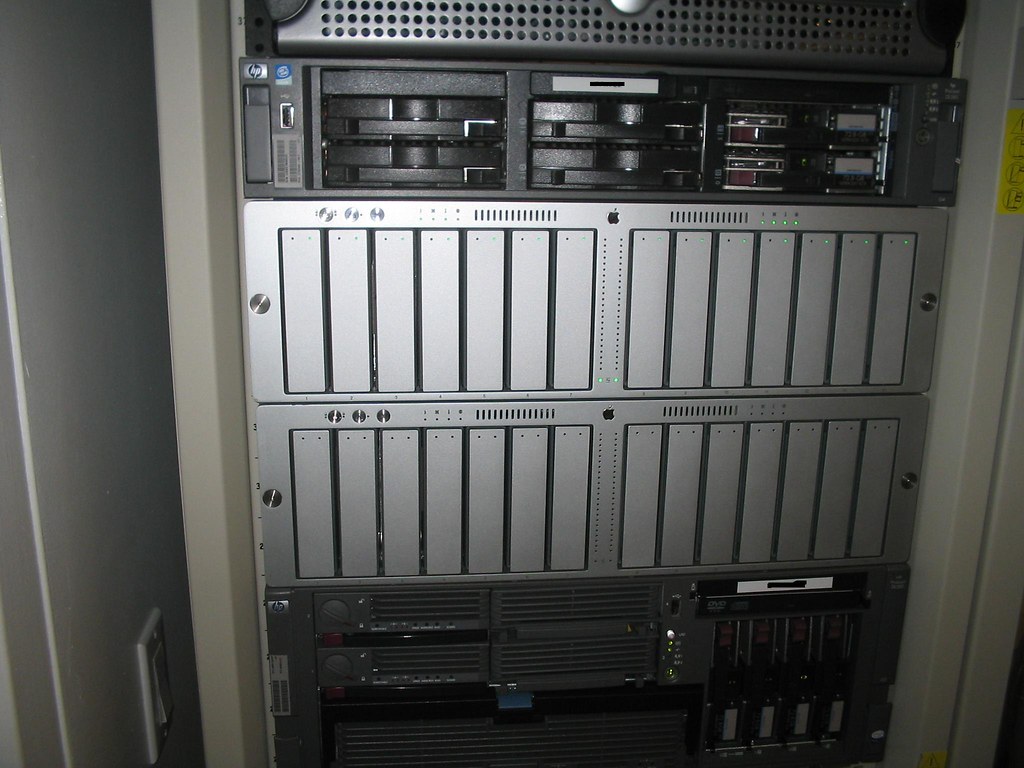
We've also added another Apple Xserve RAID. We have filled up the 5.5TB of usable storage on the first one. These devices are for archive purposes only.
The bottom one is the last added. Another 5.5TB for archive.

The bottom one is the last added. Another 5.5TB for archive.
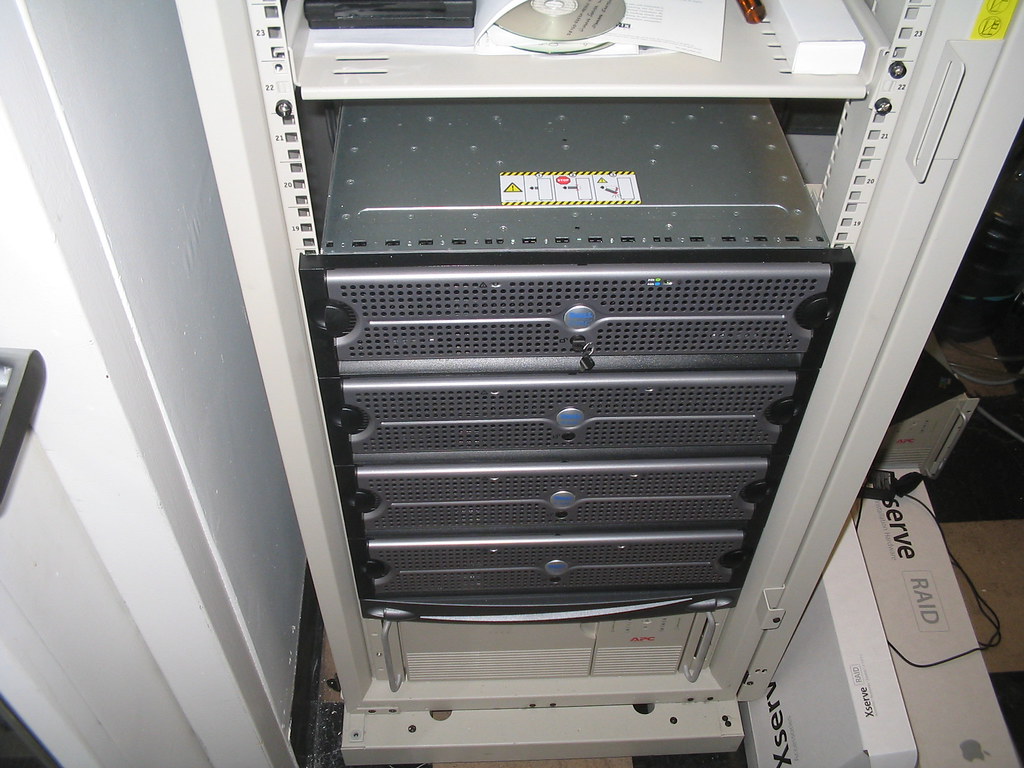
emc Clarion CX300 maxed out
We've added the last DAE to our emc CX300. It is maxed out on disks at 60 for this particular model. This last DEA was all fiber channel drives at 300GB each. It's about 3.7 TB usable data. Time to plan the upgrade path for the CX500 which I'm sure we'll need by the end of 2007.
The top DEA was the last one added.

The top DEA was the last one added.
Thursday, November 16, 2006
Riverbed install done.
It didn't take long. About an hour on the phone. We are going to have to upgrade the OS on all 6 at some point though. Just like any home router or access point the upgrade is pretty much the same way. Download the OS, browes to where it was saved and install.
Here they are. This first one is the 1020 and it is connected to another like it in London.

This next one is the 200 and it is connected to another like it in Shanghai.

to learn more about Riverbed appliances visit www.riverbed.com
Here they are. This first one is the 1020 and it is connected to another like it in London.
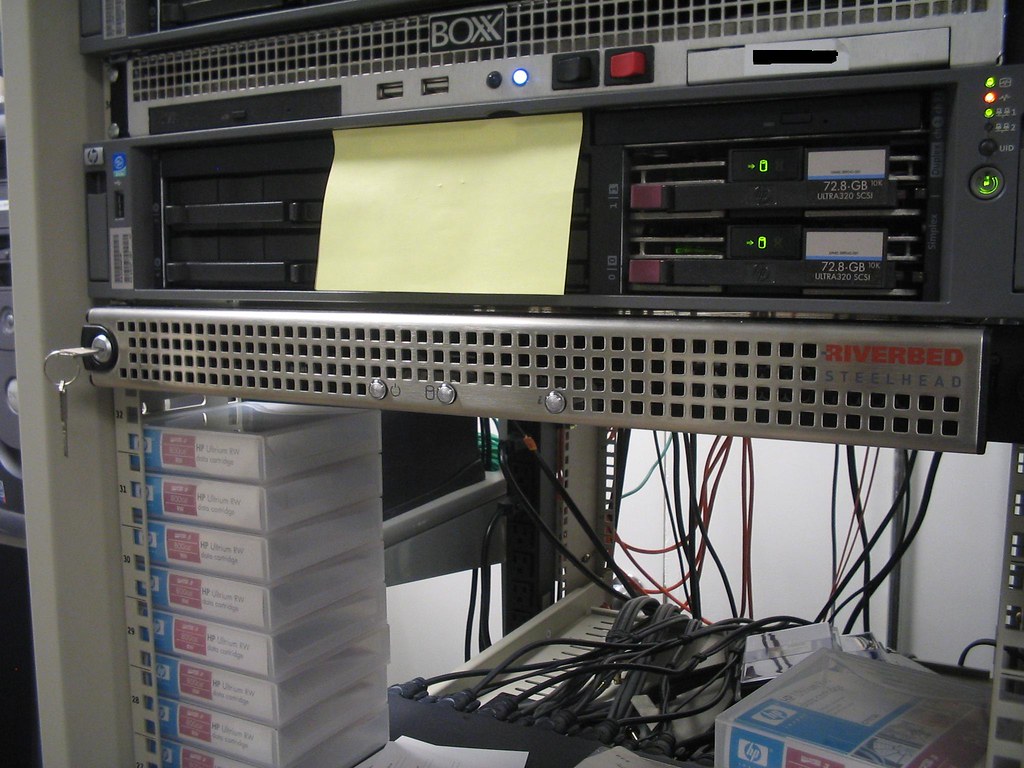
This next one is the 200 and it is connected to another like it in Shanghai.
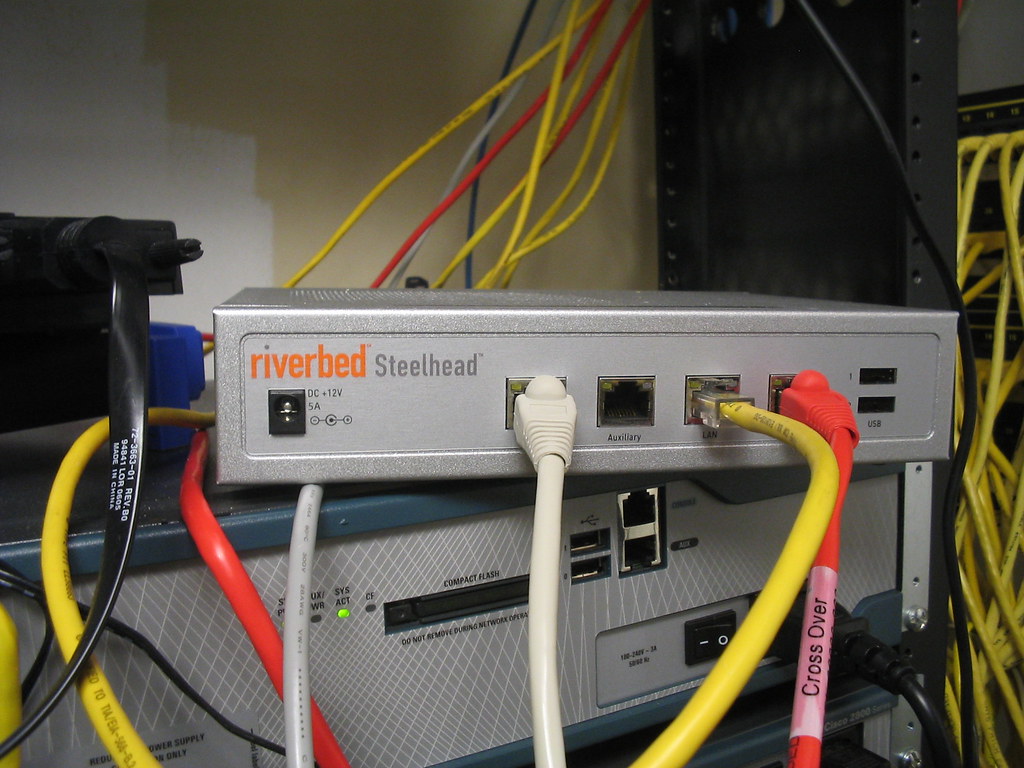
to learn more about Riverbed appliances visit www.riverbed.com
Tuesday, November 14, 2006
Second set of Riverbeds going in..
Our second set of Riverbed devices are going in tomorrow between NY and Shanghai. Nothing special but plug them in between your network and your point-to-point router.
Tuesday, November 07, 2006
IPT rollout continued
We have changed from our original plan of just rolling out IP phones to the office. The phones we were rolling and have started to roll out were the 7941G. We decided to move up to the 7941G-GE. What is the difference? Well the power requirements for both phones for starters and the bandwidth the other. what do I mean? The 7941G is a 10/100 phone that require 6.3W of power. The 7941G-GE is a 10/100/1000 phones that require 12.9W of power. Each WS-3560-48PS switch or any switch for that matter (access layer)provides a maximum of 370W of power. So if loaded up the switch with all 7941G's the power consumption would be 48x6.3W= 302.4W of power. Now that we decided for the more bandwidth option we can not add 48 7941G-GE phones to these switches (alone). They need power bricks or adapters b/c if I added these phones without them the power requirement would exceed what the switch can handle. 48x12.9=619.2W of power. That is almost twice what the switch can put out.
So in order for me to make this work smoothly I am going to disable PoE on the ports so I don't have any mishaps in the future. I'd rather plug a device in the switch and it not power up then plug a device in the switch and it blow out said switch and everything that is plug into it. So I will use the;
(config-if)#power inline never
on the range of ports I want no PoE to. Better safe then sorry.
So in order for me to make this work smoothly I am going to disable PoE on the ports so I don't have any mishaps in the future. I'd rather plug a device in the switch and it not power up then plug a device in the switch and it blow out said switch and everything that is plug into it. So I will use the;
(config-if)#power inline never
on the range of ports I want no PoE to. Better safe then sorry.
Monday, October 30, 2006
More on storage
Like I said eariler storage is the single most challenging area for me. We are ordering another DAE (disk array enclosure) for or Clarion CX300 SAN. This is the last one we can add before we have to upgrade the CX500. This new DAE would be about 3.8TB of usable storage. We are also getting another Apple Xserver RAID 7TB raw unit. Our Archive has used up 5TB already. To continue with the growth we need to have more archive space.
Thursday, October 26, 2006
Centralizing storage has allowed us to decommission 5 servers
Since we've had our SAN in place for over a year now we are finally able to get rid of a few servers. Consolidating mostly file servers is the biggest benefit. No more hanging on to these old servers, no more paying for care packs, no more worrying about hardware failures due to age, no more buying racks and UPS like mad for space. I think I've even saw the UPS meter lights drop a few bubbles. LOL.
Wednesday, October 25, 2006
Event ID: 55 continued Not what I expected
The server froze up again yesterday. That would be 3 times in the past week this happend. I never ran the chkdsk /f last night. Instead one of my Admins called up HP to see if they had any say on the matter. It came down to our array controller cards firmware being outdated. So outdated that the HP array configuration util wouldn't open up. And on top of that so outdated or bugged that the array didn't show that we had 2 failed drives. Yes these failed drive were causing the event ID 55 in OS. The firmware was updated and newer diagnostic utils were loaded on the server. Running these new tools we can see the failed drives. HP is sending up 2 replacements this morning.
I must say that from all the server I've Administered old and new I have never seen this problem before. Drive failing and not blinking red inside the array. This server is not that old either ~ 3 years old. Still pretty beefy. This is why carepacks are so important. So for all you cheap companys out there that like to cut corners, budget server warranty and service contracts and stop blaming your Admins for not being able to fix things fast enough.
I must say that from all the server I've Administered old and new I have never seen this problem before. Drive failing and not blinking red inside the array. This server is not that old either ~ 3 years old. Still pretty beefy. This is why carepacks are so important. So for all you cheap companys out there that like to cut corners, budget server warranty and service contracts and stop blaming your Admins for not being able to fix things fast enough.
Tuesday, October 24, 2006
Event ID: 55
So I'm getting this error in my system event log. No big deal accept this is on a 1.7TB volume that is in production. Not sure how long it will take to run chkdsk /f on this volume. This utility forces the volume to dismount kicking anyone off. Around here these people don't like when I have to take the server offline and I'm talking about after hours maintenance. I'll update when I run this util with how long it took.
Event Type: Error
Event Source: Ntfs
Event Category: Disk
Event ID: 55
Date: 10/24/2006
Time: 9:31:15 AM
User: N/A
Computer: **********
Description:
The file system structure on the disk is corrupt and unusable. Please run the chkdsk utility on the volume New Volume.
For more information, see Help and Support Center at http://go.microsoft.com/fwlink/events.asp.
Data:
0000: 00 00 04 00 02 00 52 00 ......R.
0008: 02 00 00 00 37 00 04 c0 ....7..À
0010: 00 00 00 00 02 01 00 c0 .......À
0018: 00 00 00 00 00 00 00 00 ........
0020: 00 00 00 00 00 00 00 00 ........
0028: c2 00 22 00 Â.".
Event Type: Error
Event Source: Ntfs
Event Category: Disk
Event ID: 55
Date: 10/24/2006
Time: 9:31:15 AM
User: N/A
Computer: **********
Description:
The file system structure on the disk is corrupt and unusable. Please run the chkdsk utility on the volume New Volume.
For more information, see Help and Support Center at http://go.microsoft.com/fwlink/events.asp.
Data:
0000: 00 00 04 00 02 00 52 00 ......R.
0008: 02 00 00 00 37 00 04 c0 ....7..À
0010: 00 00 00 00 02 01 00 c0 .......À
0018: 00 00 00 00 00 00 00 00 ........
0020: 00 00 00 00 00 00 00 00 ........
0028: c2 00 22 00 Â.".
Thursday, October 19, 2006
phone calls
I get all kinds of phone calls. These days I don't even answer my phone anymore. My wife says to me I tried calling you but you must have been busy. I said yeah I was busy screen my calls. LOL! Anyhow I've had to blow off a few people for a long time until one day I have to just deal with them. One guy called me the begining of the year, I told him call me back b/c I don't feel like getting into what ever it is he is trying to sell me. He calls back a few weeks later asking if I remember him. I say no (of course I did) so he goes on to tell me who he is what he has and how I can benifit from it. I say not interested right now and I have to go. He asks if he can try back at later time and gives a specific date. Out of anger a frustration b/c I'm busy I say yeah try back then just to get him off my phone. Sure enough this same damn guy calls back on the date LOL. I tell him call back again and I tell him I'm going on leave for a month so I won't be around. Anyway when I got back from my leave (new born baby girl :D). I think I've have a change of heart this guy calls back so I talk to him for about 40 mins and I explain to him how we do things here and how his product is just not right for us. I even volentarily give him more information about what I am looking in regauds to the issues I am currently facing. He them recommended some expensive products to me. We end the call and I was sure that was the end of him. A few weeks later this same guy calls one of my Admins singing the same damn song O_o!
Old Story***Exchange 5.5 migration gone wrong
I couple of years ago when we were in the midst's of migrating from exchange 5.5 to exchange 2003 we had planned the process for weeks. Myself and a consultant that I've used for a long time set a date for a Saturday morning. Early morning to get a head start. We had both servers ready. New and old (I mean real old).
We started the day by installing 2003 server on the new box as well as exchange 2003. We added if the server to the Organization and both servers were talking. We ran tests and check the whole way and everything was looking fine. We went back to the 5.5 server to load up the tools to do mailbox move. With NT 4.0 and Exchange 5.5 everything needed a reboot. We proceed to reboot the server. It shuts down and comes up in a BSOD. Blue Screen of Death.....WTF. We do a hard restart and cross our fingers. Same thing when it restarted BSOD. We put a call into Microsoft and after an hour on the call it boils down to reinstalling the OS. So we do that and exchange is pretty much F@&%ed.
We were able to see the files that represent both stores. We copy the stores over to another server as a near line backup just in case. but at that time both stores were about 130GB in total. That took at that time a few hours to copy. Once that was done copying we reinstalled exchange 5.5 and service packs. Once this was done we had to copy the data back to the exchange 5.5 server. So that took another few hours to copy back. It's going from evening to night now. The files are done copy but we have to run ISinteg and other tools to defrag the database stores. We locate another area on the network to defrag the store to. Now this process takes a few more hours. Once the defrag process is done we had to remove the old data base store and copy the newly defraged ones back to the server. This was going to take a few more hours to copy.
During these night time copying we decide to attempt to sleep. there is no place comfy to sleep in the office so I grab some old boxes and lay them out on floor. One of my coworkers (female) had a sweater on her chair she leave at work for when the office gets cold, I used that to keep worm that night. Shhh, don't tell her. So I get a nap on the floor and Sunday morning rolls around.
I am now here a full 24 hours. the files are done copying. We attempt the start the exchange 5.5 services and they come up. So we are now back to square one where we were 24 hours before. We install the tools again and cross our finger that the server does not again BSOD. The server reboots and all is fine. Now we are using the mailbox move tool to move hundreds of mailboxes over to the new server. This too takes time so we wait and watch one by one moving over (in groups of 10). It's midday on that Sunday and we are about half way done with the mailboxes. We still have the 80GB with of public folders to do after this. We ended up finishing all mailboxes sometime in mid afternoon. We run tests to see if emails are working on the new server and they are.
Half the battle done now for the public folders. To get these over is different from the mailbox move wizard. I can't remember what processes were available at the time but I ended up exporting my entire public folder to a file and importing it in my new exchange 2003 server. This caused problems b/c not all of the data was exported/imported. My public folders run deep and has many sub folders. So of the sub folders either didn't show up in the new server or the contents were missing. So I had individually export and import specific folders. All of this importing, exporting took the rest of Sunday night into Monday morning. I was done for the most part my Monday 9am.
I still didn't go home. As users began to login I stuck around to make sure everyone was OK with Outlook and accessing anything in the new Exchange 2003 server. I got a few calls about the data in the public folders not being there but that was an easy fix. Export, import. I ended up going home about 4pm Monday afternoon and still went in on Tuesday regular time. The missing data calls kept coming in months after the migration was complete but I kept the old exchange 5.5 online and unplugged from the network just in case. To this day I still have that old server sitting there and I am now ready to throw it out for good. If calls about missing data come up we tell them that data has been removed for good.
I was at work for about 52 hours straight that time. No shower, no shave, no teeth brushing (ginger ale :D) no deodorant, no change of cloths and hardly ate. I was a mess but I got the job done and that's all that mattered to me. Yes I have been though the trenches and that was the last time I laid my head to floor at work either but I'll leave that story for another time.
We started the day by installing 2003 server on the new box as well as exchange 2003. We added if the server to the Organization and both servers were talking. We ran tests and check the whole way and everything was looking fine. We went back to the 5.5 server to load up the tools to do mailbox move. With NT 4.0 and Exchange 5.5 everything needed a reboot. We proceed to reboot the server. It shuts down and comes up in a BSOD. Blue Screen of Death.....WTF. We do a hard restart and cross our fingers. Same thing when it restarted BSOD. We put a call into Microsoft and after an hour on the call it boils down to reinstalling the OS. So we do that and exchange is pretty much F@&%ed.
We were able to see the files that represent both stores. We copy the stores over to another server as a near line backup just in case. but at that time both stores were about 130GB in total. That took at that time a few hours to copy. Once that was done copying we reinstalled exchange 5.5 and service packs. Once this was done we had to copy the data back to the exchange 5.5 server. So that took another few hours to copy back. It's going from evening to night now. The files are done copy but we have to run ISinteg and other tools to defrag the database stores. We locate another area on the network to defrag the store to. Now this process takes a few more hours. Once the defrag process is done we had to remove the old data base store and copy the newly defraged ones back to the server. This was going to take a few more hours to copy.
During these night time copying we decide to attempt to sleep. there is no place comfy to sleep in the office so I grab some old boxes and lay them out on floor. One of my coworkers (female) had a sweater on her chair she leave at work for when the office gets cold, I used that to keep worm that night. Shhh, don't tell her. So I get a nap on the floor and Sunday morning rolls around.
I am now here a full 24 hours. the files are done copying. We attempt the start the exchange 5.5 services and they come up. So we are now back to square one where we were 24 hours before. We install the tools again and cross our finger that the server does not again BSOD. The server reboots and all is fine. Now we are using the mailbox move tool to move hundreds of mailboxes over to the new server. This too takes time so we wait and watch one by one moving over (in groups of 10). It's midday on that Sunday and we are about half way done with the mailboxes. We still have the 80GB with of public folders to do after this. We ended up finishing all mailboxes sometime in mid afternoon. We run tests to see if emails are working on the new server and they are.
Half the battle done now for the public folders. To get these over is different from the mailbox move wizard. I can't remember what processes were available at the time but I ended up exporting my entire public folder to a file and importing it in my new exchange 2003 server. This caused problems b/c not all of the data was exported/imported. My public folders run deep and has many sub folders. So of the sub folders either didn't show up in the new server or the contents were missing. So I had individually export and import specific folders. All of this importing, exporting took the rest of Sunday night into Monday morning. I was done for the most part my Monday 9am.
I still didn't go home. As users began to login I stuck around to make sure everyone was OK with Outlook and accessing anything in the new Exchange 2003 server. I got a few calls about the data in the public folders not being there but that was an easy fix. Export, import. I ended up going home about 4pm Monday afternoon and still went in on Tuesday regular time. The missing data calls kept coming in months after the migration was complete but I kept the old exchange 5.5 online and unplugged from the network just in case. To this day I still have that old server sitting there and I am now ready to throw it out for good. If calls about missing data come up we tell them that data has been removed for good.
I was at work for about 52 hours straight that time. No shower, no shave, no teeth brushing (ginger ale :D) no deodorant, no change of cloths and hardly ate. I was a mess but I got the job done and that's all that mattered to me. Yes I have been though the trenches and that was the last time I laid my head to floor at work either but I'll leave that story for another time.
Subscribe to:
Posts (Atom)